Where Can I Cancel the Customer's Subscription?
To cancel a customer’s subscription, follow these steps within the Joy Subscriptions app:
Step 1: Open the Joy Subscriptions App
Begin by opening the Joy Subscriptions app from your Shopify admin.
Step 2: Select Subscriptions
Navigate to the Subscriptions section within the app.
Step 3: Identify the Subscription to Cancel
Browse through the list of active subscriptions to find the one you wish to cancel. Click on the specific subscription to open its details.
Step 4: Choose an Action from More Actions
In the subscription details, go to the More Actions menu. Here, you can select one of the following options:
- Pause Subscription: Stop receiving new orders until the customer resumes their subscription.
- Cancel Subscription: Permanently cancel the subscription.
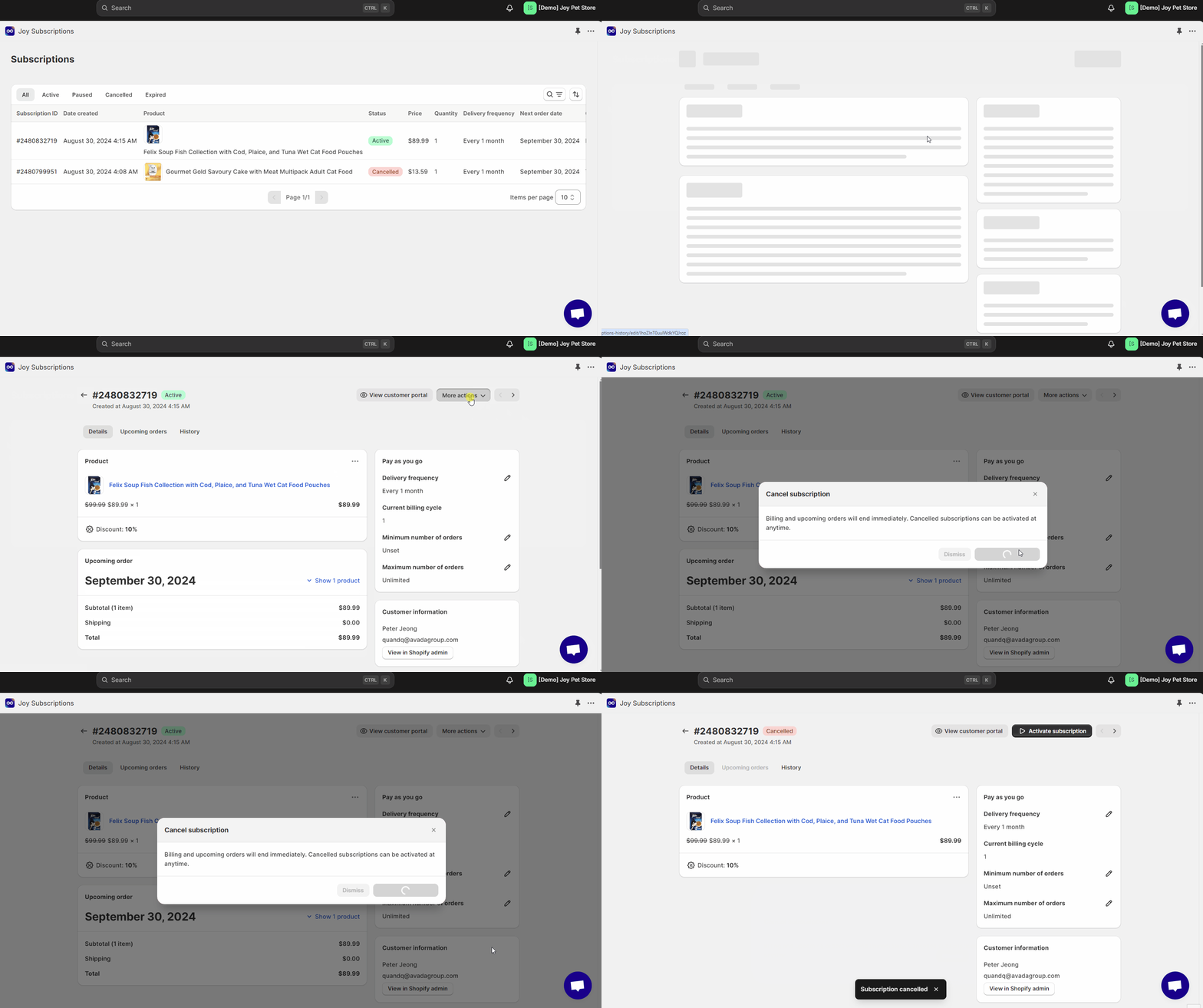
By following these steps, you can effectively manage and cancel your customer's subscriptions as needed.