Where Can I Cancel the Customer's Subscription?
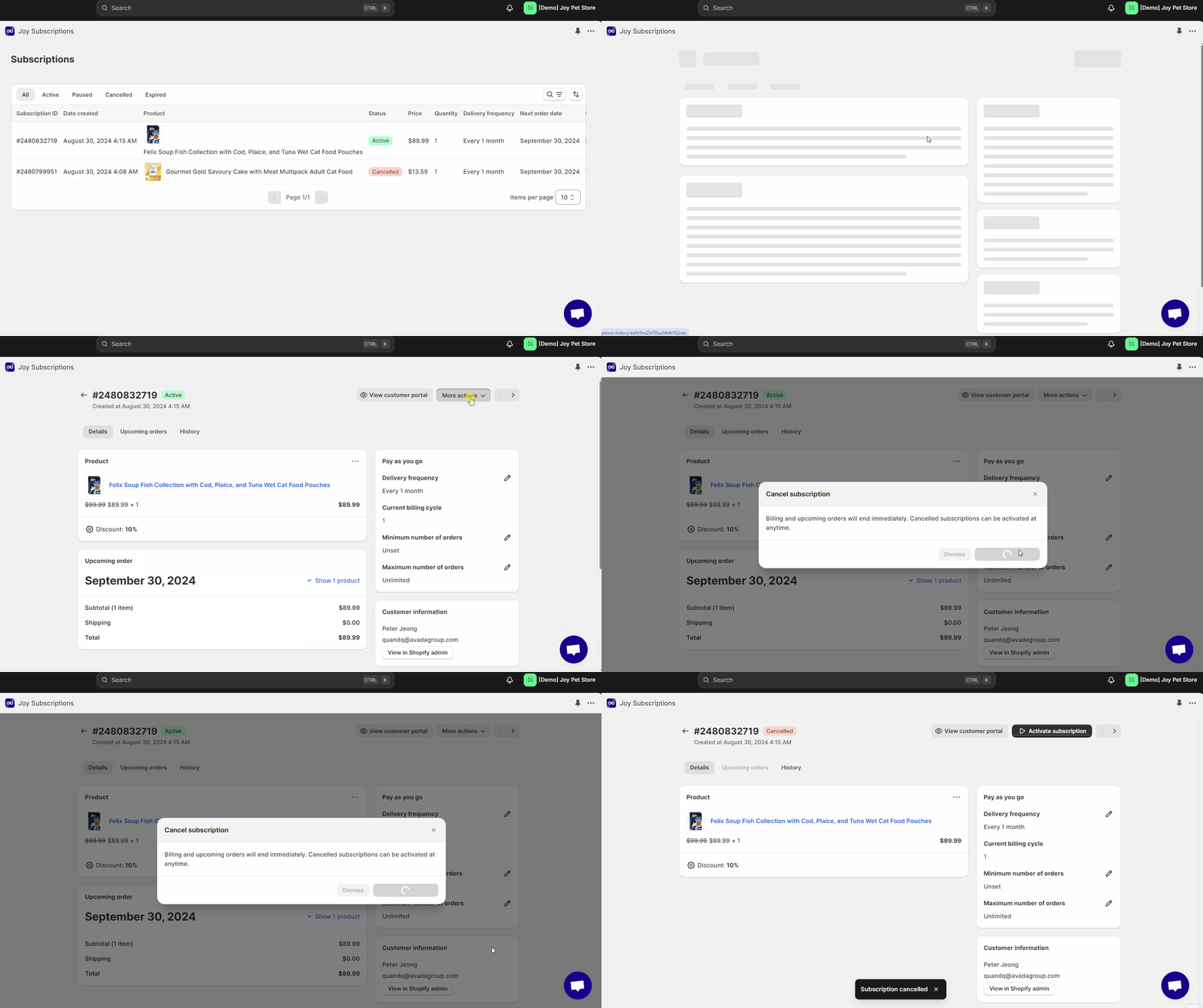
In the Joy Subscriptions app, open Subscriptions, click the subscription, then choose Cancel Subscription from the More Actions menu.
To cancel a customer’s subscription, follow these steps within the Joy Subscriptions app:
Open the Joy Subscriptions App
Begin by opening the Joy Subscriptions app from your Shopify admin.
Select Subscriptions
Navigate to the Subscriptions section within the app.
Identify the Subscription to Cancel
Browse through the list of active subscriptions to find the one you wish to cancel. Click on the specific subscription to open its details.
Choose an Action from More Actions
In the subscription details, go to the More Actions menu. Here, you can select one of the following options:
- Pause Subscription: Stop receiving new orders until the customer resumes their subscription.
- Cancel Subscription: Permanently cancel the subscription.
By following these steps, you can effectively manage and cancel your customer's subscriptions as needed.
Related articles
Was this article helpful?